Back in the day, I was obsessed with building games—I even coded my first one on a TI-82 calculator! But I’d never opened the Pandora’s box of 3D development; it always felt like the “final boss.” Last year, I used a long train ride as an excuse to finally dive in, using Cursor to see how AI could level up my workflow.
That’s how Avion, a 3D flight simulator, was born. What started as a tiny, one-file experiment escalated quickly. After a year of refining the physics and modularising the UI, the project has ballooned into a serious codebase: 80 files and 15,000 lines of code!
Performance is hard
I probably spent most of my time chasing the frame rate (FPS). This is the number of images the user sees per second. When this number is too low, the game feels laggy and it’s frustrating to the user because the commands are not reacting well.
We consider a game “smooth” when we have 60 FPS (Frames Per Second). In other words, it means that in 16.6ms the game needs to calculate the flight physics, detect a potential collision, process the user inputs, move the plane on the board, move the clouds, animate elements…
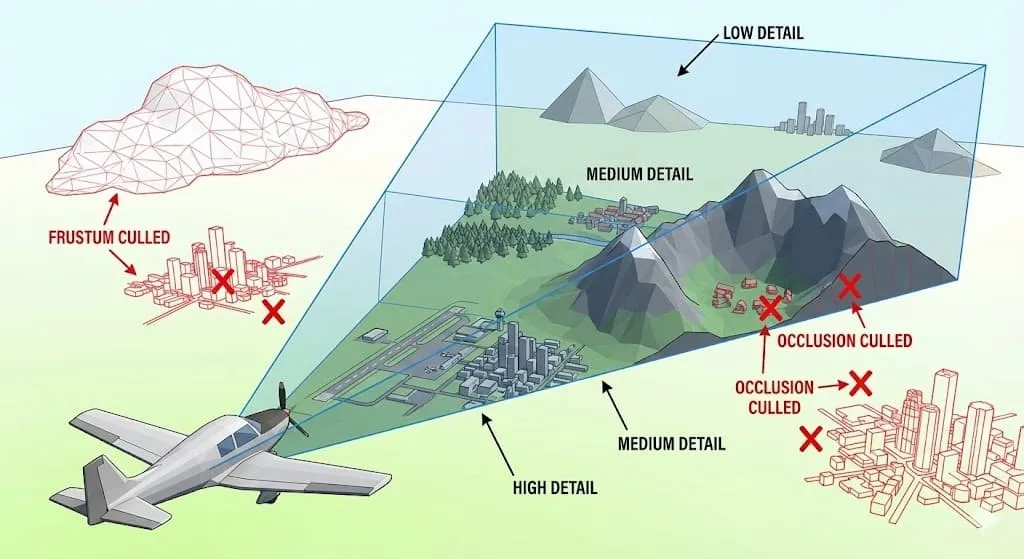
To prevent the FPS counter from going crazy, I had to implement a few tricks:
-
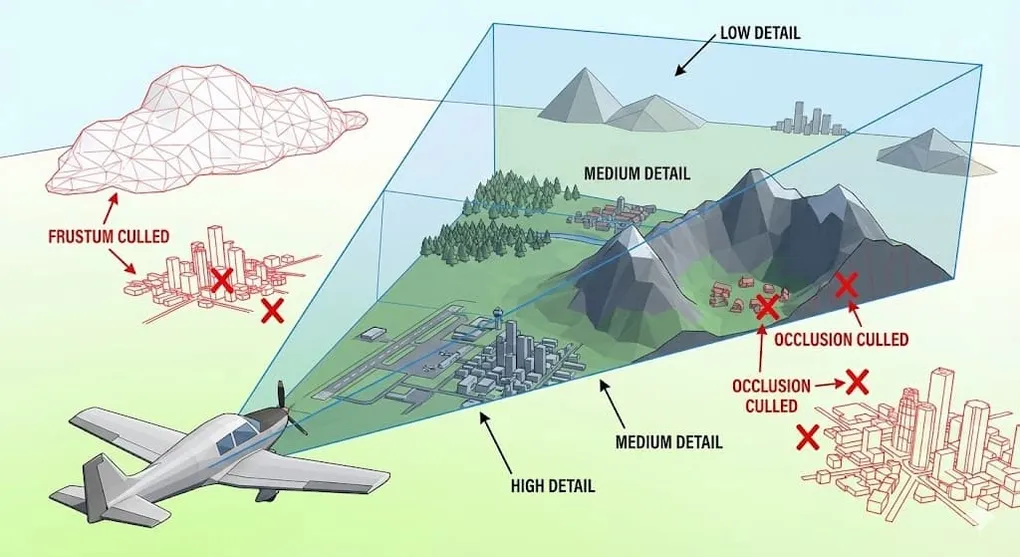
Level of Details (LOD): the farther an object is, the lower quality it will have. In Avion, the trees that are too far away will only render a bush. The trunk will be hidden. When you play open-world games, and you travel fast, you may have the feeling that a lot of objects appear at once. It’s usually because the loop was stuck and the LOD didn’t refresh at the right pace.
-
Frustum culling: prevents rendering objects outside the camera view (the frustum). Frustum Culling in the game Horizon: Zero Dawn
-
Occlusion culling: It’s usually the next step after implementing the frustum culling. In a nutshell, if a house is hidden from the screen behind a mountain, there’s no point of rendering it.
-
Frame skipping: Instead of detecting collision on every frame, I do it every 3 frames. If the plane crashes, the user will know it a bit later. But when you have ~45 frames per second, it means the user will know it 0,04s later.
-
Hardware Instancing: at the beginning of the game, I had in the sky ~350 clouds. Each cloud consisted of multiple spheres (20-30). Since the clouds are moving in the sky, the GPU had to draw 25x350 ≈ 8 750 elements. Every 16.6ms!
Hardware Instancing is a pattern that fixes this issue. It tells the GPU: “The geometry is a constant. The only things that change are the coordinates”. Instead of having 1 000 draw calls for 1 000 clouds, I only have 1! (It can be more if you have multiple variants of clouds).
Math and Physics… everywhere!
First of all, what makes a plane fly? Physics… it’s everywhere!
The Rotation Headache
To navigate in the air, a plane can rotate across nested rings (gimbals), corresponding to one axis of rotation:
- Pitch is the rotation around the aircraft’s wings. It makes the nose point up or down.
- Roll is the rotation around the aircraft’s nose-to-tail axis. It makes the plane roll (like a barrel)
- Yaw is the rotation around the aircraft’s vertical axis. It makes the nose turn left or right.
These 3 angles are also known as Euler angles.
When a plane takes off, all these rings rotate independently up to a point where 2 axes become perfectly aligned. And it’s suddenly impossible to distinguish some of the rotations. I mean, it’s impossible to distinguish between doing a Roll and doing a Yaw. As a result, the plane makes unwanted movements. This phenomenon is called Gimbal Lock.

A solution for this is to use quaternions. Instead of using the 3 nested rings, it calculates a single rotation around an arbitrary axis (which never locks up).
Most game engines, like Unity or Unreal, use quaternions.
Collision and Crash Detection
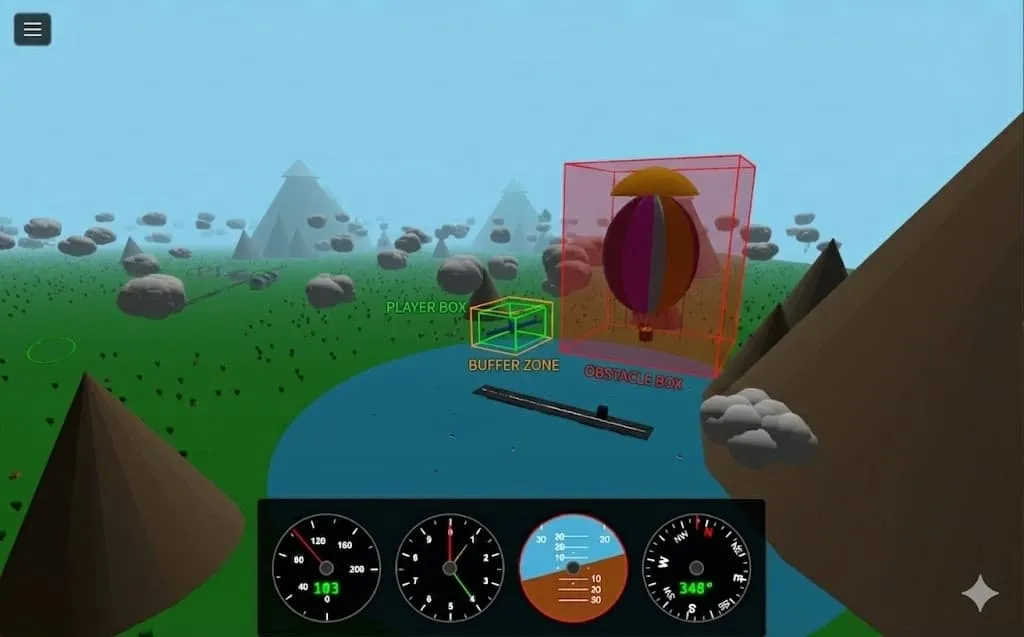
Next up was collision detection. It’s a fundamental part of any game—it’s how you pick up items, take damage, or interact with the world. The catch? Even a simple game has hundreds of thousands of elements to check, and it has to happen constantly. To keep things running smoothly, I use a few tricks:
-
Distance Culling: If an object is too far away or significantly below the plane, the engine ignores it entirely. There is no need to run expensive collision checks with a tree if the player is flying 100 meters above the sea.
-
Simplistic shapes: Instead of checking every complex shape (like a tree made of a cube and spheres), I simplify the math. Everything is a box or a sphere. Sometimes the box is smaller than the actual object.
Even the plane has no collision mesh. It’s treated as a point with a small radius. It could be problematic if the user tries to enter a collision with a wing and a building. But I voluntarily put the building far away from the runway. Using a small radius prevents having “phantom crashes”. Crashes that happen when the user feels like they didn’t actually hit the obstacle. It also increases the “Woah, that was close!” effect!
-
AABB Shortcut: To calculate the distance between two points, we usually use Euclidean Distance (based on the Pythagorean theorem). But this can be a bit slow because of the square root.
I use Axis-Aligned Bounding Boxes (AABB). Basically, it wraps everything into boxes (aligned) and checks if the coordinates are overlapping. This is ludicrously fast and takes almost no CPU power.
// Euclidean Approach (Slower)function isCollidingEuclidean(objA, objB) {const dx = objA.x - objB.xconst dy = objA.y - objB.yconst dz = objA.z - objB.z// The square root is the "expensive" partconst distance = Math.sqrt(dx * dx + dy * dy + dz * dz)return distance <= 0}// AABB Shortcut (Faster)function isCollidingAABB(a, b) {return (a.minX <= b.maxX &&a.maxX >= b.minX &&a.minY <= b.maxY &&a.maxY >= b.minY &&a.minZ <= b.maxZ &&a.maxZ >= b.minZ)}An alternative is to bypass the expensive square root by comparing squared distances. If you want to read more about it, there’s a good post about it on the MDN.
Realism vs Fun
At the beginning, I was tempted to make my game as close to reality as possible. I wanted to build a real flight simulator, but with a simplistic design.
Slowly, I realised that this scientific accuracy was negatively impacting the fun part of this game. So I ended up shifting the “cursor” toward something more arcade. And I think it’s ok. First-person shooters or games like GTA would be god damn boring if you have to send your character to the hospital every time he takes a bullet!
Not every optimisation turned out to be a game-changer. Some tricks barely moved the needle. But beyond the frame rate battles, building Avion was a great excuse to dust off geometry and trigonometry I hadn’t touched since school.
And in the end, my best takeaway? I built something fun, and I still find myself hopping back into the cockpit to chase some challenges!
Want to try it out? → avion-game.netlify.app
About the author

Hey, I'm Maxence Poutord, a passionate software engineer. In my day-to-day job, I'm working as a senior front-end engineer at Orderfox. When I'm not working, you can find me travelling the world or cooking.
Follow me on Bluesky